


Scripted 3270 workflows that replay human online integration at unlimited scale — a command-line utility, an API server, and a live operations console served straight from the binary, with no external dependencies at runtime.
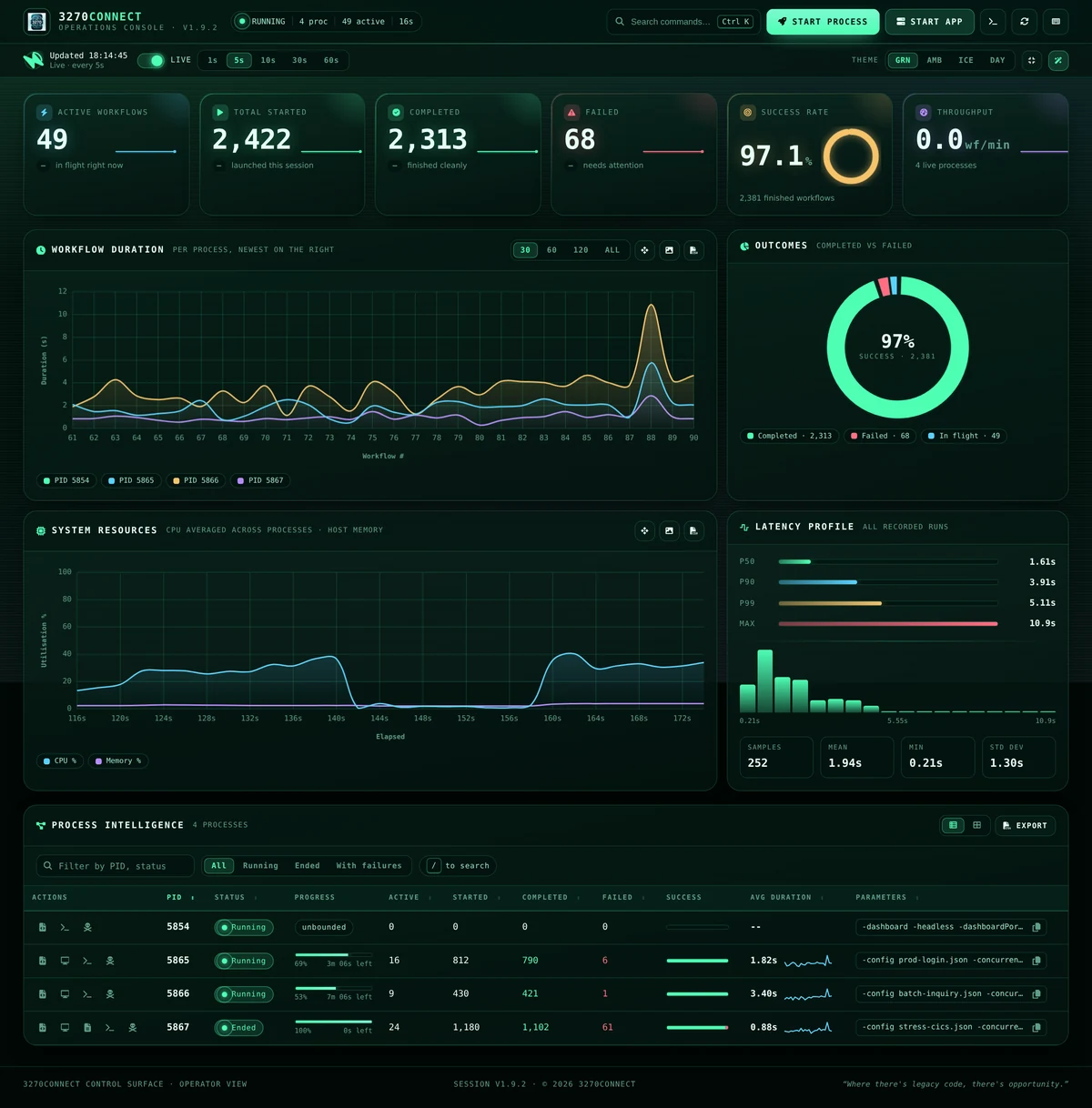
▶ Watch the operations console at work — an eight-worker load run launched from the browser, then the process table, the live screen flow and the charts filling in. Shorter walk-throughs — your first workflow, running at scale, the API, sign-in, the host profiler and MCP — are on the documentation home page.
3270Connect bridges modern computing environments and traditional mainframe terminals, providing a suite of tools that automate tasks and workflows in a terminal session. It is used by system administrators, developers, and testers who work with mainframe systems — still pivotal in banking, insurance, and government services — to script complex sequences of tasks, automate data entry, perform online operations, and capture terminal screens for logging or debugging.
Its main value is removing repetitive work: the same set of operations, run reliably and repeatedly, at whatever concurrency a test calls for. It also gives mainframe operations a way into modern CI/CD pipelines.
With 3270Connect, users can:
- Define and execute automated workflows through a configuration file, enhancing repeatability and reliability in interactions with terminal screens.
- Capture the state of the 3270 terminal screens at any point during a workflow, which is invaluable for documentation and troubleshooting.
- Execute multiple workflows in parallel, optimizing time and resources, especially in complex test environments.
- Watch a run live in the operations console — KPIs, latency percentiles, log streaming and per-process control, served from the binary itself.
- Operate in a headless mode, allowing the automation to run in the background or in environments without a graphical interface, such as servers or continuous integration systems.
- Utilize a verbose output mode for an in-depth understanding of workflow execution, which assists in monitoring and debugging.
- Surface failure-only logging with
-verboseFailuresto collect concise diagnostics at high concurrency without the noise of full verbose output. - Run 3270Connect as an API server, enabling advanced automation scenarios and facilitating load and performance testing of mainframe applications.
Through these features, 3270Connect empowers organizations to integrate their legacy systems into modern automated processes, reducing errors, and increasing efficiency.
3270Connect runs workflow JSON; its companion product
3270Web is where that JSON is usually
produced. 3270Web is an enterprise-grade 3270 terminal in the browser whose AI
auto-navigation explores a host, maps every screen, and exports the full screen
coverage it achieved as a 3270Connect-compatible workflow.json — so a load
profile comes from the real application rather than being written by hand. The
two also emit the same CompatibilityProfile schema, so host profiles taken by
either tool diff cleanly against each other.
3270Web                                            3270Connect
──────────────────────────────────────────         ─────────────────────
browse  →  AI discovers  →  screen graph   ─┐
                            + business fns  ├──→  workflow.json  →  concurrent
run by prompt  ←────────────────────────────┘                       load / volume
                                                                    / CI runs
Windows SmartScreen notice
This app is digitally signed.
If Windows shows “protected your PC”, click More info → Run anyway.
The warning disappears automatically as usage grows.
curl -fsSL https://3270connect.3270.io/install.sh | bashThe installer asks how you want it: a single binary on your PATH, one Docker container running the operations console, a Compose stack you can edit, or the lab — the console, a browser terminal and a 3270 host to point them both at, on one network.
# The whole thing, without being asked anything
curl -fsSL https://3270connect.3270.io/install.sh | bash -s -- --method lab --yes
http://localhost:3270 the terminal. Connect to host "sampleapps", port 3271
http://localhost:9200 the operations console
Nothing in the lab is a mainframe: the applications are 3270Web's bundled
sample screens served as an ordinary TN3270 host, which is what makes them safe
to point a load test at. The same stack is checked in here as
docker-compose.lab.yml, and the console on its own as docker-compose.yml.
Direct downloads for Linux and Windows, and the container image
(ghcr.io/3270io/3270connect), are covered in the
installation guide.
Out of the box the operations console has no sign-in, and its Start Process dialog launches a load run for whoever can open the page — so every stack here publishes on
127.0.0.1. Reach it from elsewhere over an SSH tunnel, or give it accounts withAUTH_MODE=local. See Accounts and Sign-In.
Here are the key features of 3270Connect:
- Running workflows defined in a configuration file.
- Command-line interface for scripting and running automation from the terminal.
- Capturing the 3270 screens as the workflow executes.
- Running workflows concurrently with options for controlling the number of concurrent workflows and runtime duration.
- Operations console for live workflow metrics, latency percentiles, log streaming and per-process control — served entirely from the binary, with no external dependencies at runtime.
- Optional accounts and sign-in (
AUTH_MODE=local): per-user passwords, groups that carry a role, per-account API tokens, OIDC single sign-on, and an administration area with an audit trail. Off by default, because one operator on their own machine does not need it. - Headless mode for running workflows without a graphical user interface.
- Verbose mode for detailed output, plus failure-only logging with
-verboseFailuresfor noisy test loads. - API mode for advanced automation.
- Runtime RSA token injection using the
-tokenflag or APITokenproperty, keeping one-time passwords out of workflow files. - Configurable host EBCDIC code page / character set via the workflow
CodePageproperty or the-codePageflag (for examplecp037,cp285, orcp278/finnish) so national and language-specific characters render correctly. - Prometheus
/metricsendpoint (-promListen) exposing connect/step timing histograms, workflow outcomes, and live worker count for fleet-scale monitoring. - One-shot host compatibility profiler (
-profile) that writes aCompatibilityProfileJSON document — same schema as 3270Web — for cross-environment comparison and chaos mind-map diffs. - Running a 3270 sample application to assist with testing workflow features.
- The emulator script connection uses a 5-second TCP dial timeout (
scriptDialTimeout) and a 30-second I/O deadline (scriptIOTimeout) when communicating with the embedded x3270/s3270 instance.
Source:connect3270/emulator.go. - Establishing a TN3270 session runs through
Emulator.Connect, which retries up to 10 times with a 1-second delay between attempts (maxRetries/retryDelay). Starting the emulator process itself is also retried up to 10 times before surfacing an error.
Source:connect3270/emulator.go. - After a successful
Connect, the workflow waits for the terminal to unlock an input field (WaitForField) using a 1-second timeout and up to 10 retries before each step. Disable this with top-levelWaitForField: falsein the config and/or add explicitWaitForFieldsteps where needed.
Source:go3270Connect.go. - Connection failures for the workflow Connect step are informational by default and do not increment the failed workflow counter; pass
-showConnectionErrorsif you want connection failures to be treated as errors and surfaced in the failure tally.
Use-verboseFailuresto log failing steps without enabling full verbose when you need concise failure diagnostics at scale.
Source:go3270Connect.go. - The
/testConnectionAPI endpoint that probes host reachability uses a 5-second TCP dial timeout when opening the socket to the TN3270 host.
Source:go3270Connect.go.
3270 sessions exchange data in EBCDIC, so the correct national code page (host character set) must be selected for accented and language-specific characters to render correctly. Set it either in the workflow JSON with the CodePage property or on the command line with -codePage (the flag overrides the JSON value):
# Finnish/Swedish host (cp278)
3270Connect -config workflow.json -codePage cp278
{ "Host": "mvs.example.com", "Port": 992, "CodePage": "cp278", "Steps": [ ... ] }The value is passed straight to the embedded x3270/s3270 -codepage option, so any code page name (cp037), alias (finnish), or number (278) the emulator recognizes is accepted. When unset, the emulator default is used. In API mode the per-request CodePage property wins, falling back to the -codePage flag the server was started with. See the Basic Usage guide for the supported code page list.
Enable the Prometheus listener with -promListen <addr>:
3270Connect -config workflow.json -concurrent 10 -runtime 300 -promListen :9091Collectors:
tn3270_connect_seconds— histogram of TN3270 session establishment time.tn3270_step_seconds{action}— histogram of per-step wall time.tn3270_workflow_total{result}—success/failure/connect_failedcounter.tn3270_concurrent_workers— live worker gauge.
See the Metrics & Monitoring guide for example queries and a Prometheus scrape config.
Run a one-shot probe against a host and capture its negotiated terminal model, protocol options, capabilities, and timing:
3270Connect -profile -profileHost mvs01.example.com -profilePort 992 -profileTLS \
            -profileOut mvs01.profile.json
The resulting CompatibilityProfile JSON document uses the same schema as 3270Web's POST /profile endpoint, so profiles produced by either tool can be diffed against each other (e.g. IBM z/OS vs Rocket Enterprise Server). See the profiler guide and the schema reference.
Recent releases tightened input handling across the dashboard and API surfaces. User-facing guarantees:
- Sample-app launch arguments are validated against an allow-list — no shell or argument injection via crafted process names.
- Uploaded workflow filenames in the dashboard's
start-processhandler are sanitised; path separators and traversal sequences are rejected. - The dashboard rejects absolute or parent-escaping values for
overrideOutputFilePath; outputs always land under the configured working directory. getNextAvailablePortis bounded and propagates exhaustion errors instead of looping indefinitely under heavy concurrency.- Optional authentication (
AUTH_MODE=local/oidc): Argon2id password hashes, throttled sign-ins, sessions that expire and can be pinned to an address, per-account API tokens stored as hashes, and an append-only audit trail. A load run belongs to whoever started it; stopping somebody else's needs an administrator. - Browser-initiated cross-site requests are refused on every state-changing endpoint, using
Sec-Fetch-Sitewhere the browser sends it andOrigin/Refererotherwise. Scripted clients, which send none of the three, are unaffected. - The sign-in and administration pages carry a strict content-security policy and are served with no inline script or style.
- Documentation
- Accounts and Sign-In
- Administration
- AI Chat Mode
- Metrics & Monitoring
- Host Compatibility Profiler
3270Connect is licensed under the MIT Licence — see
LICENSE.
It stays MIT deliberately. This is a toolkit meant to be imported, wrapped and embedded — dropped into a CI pipeline, called from someone else's test harness, or used as a Go package — and a copyleft licence would defeat that. Take it, build on it, ship what you build under whatever terms you like.
3270Web, the browser terminal alongside
it, is AGPL-3.0-or-later: a network application, where the trade is a different
one. The two repositories share several internal/ packages, which now means
code may be copied from here into 3270Web, but not the other way unless the
copyright holder owns it. See Shared packages below.
The s3270 binaries redistributed in every release keep their own BSD 3-Clause
terms; those are recorded in
THIRD-PARTY-LICENSES.md.
internal/{authz,authsession,users,apitoken,audit,oidc,reqsec,agent,profiler}
are kept deliberately identical to their counterparts in 3270Web — same
variable names, same roles, same group model, same token format — by copying
between the two repositories rather than by a module dependency.
That copying now crosses a licence boundary, and it only runs one way:
- MIT → AGPL is fine. Anything here may be copied into 3270Web.
- AGPL → MIT is not, unless the copyright holder wrote it or the
contributor granted the additional permission set out in 3270Web's
CONTRIBUTING.md.
Today every line in those packages is the maintainer's own, so both copies are lawful — a copyright holder may license their own work under any number of licences at once. The rule matters for what comes next: an outside contribution landing in 3270Web must not be copied back here without checking. When a change belongs in both, write it here first and copy it across in the permitted direction.
go-bindata -o binaries/bindata.go -pkg binaries ./binaries/...
CGO_ENABLED=1 GOOS=linux GOARCH=amd64 go build -o 3270Connect .
CGO_ENABLED=1 GOOS=windows GOARCH=amd64 go build -o 3270Connect.exe .
.\3270Connect -runApp 1 ./3270Connect -verbose -headless
mkdocs build
Run .\update-binaries.ps1 from the repo root after you update binaries/linux or binaries/windows. The script now simply runs go-bindata -o binaries/bindata.go -pkg binaries ./binaries/... against the assets that already live in those directories, so make sure the native executables you need are in place beforehand.
3270Connect does not speak TN3270 itself. Every workflow step is carried out by s3270, the scripting member of the x3270 family of 3270 terminal emulators, whose pre-compiled binaries ship inside every 3270Connect release. Three decades of faithful 3270 protocol work by Paul Mattes and the x3270 contributors, given away for anyone to build on — 3270Connect would not exist without it. Our thanks to them.
s3270 is BSD 3-Clause licensed; the full text, and the list of which
executables are redistributed on which platform, is in
THIRD-PARTY-LICENSES.md.
The 3270Connect mark and its lockups live in brand/ — SVG, PNG and
.ico, in a dark-ground and a light-ground pair. They are generated from the shared kit in the
3270io repo (brand/build.mjs); regenerate
there rather than editing these by hand.
The console serves two copies from templates/static/images/: logo.png is the
phosphor mark, for the header tile on the dark console, and favicon.png is the
daylight-green icon, for the browser tab — phosphor is tuned for a dark terminal
and goes milky against white tab chrome.