





Website, tutorial and screenshots: https://ekourkchi.github.io/AstroVista-Lite/
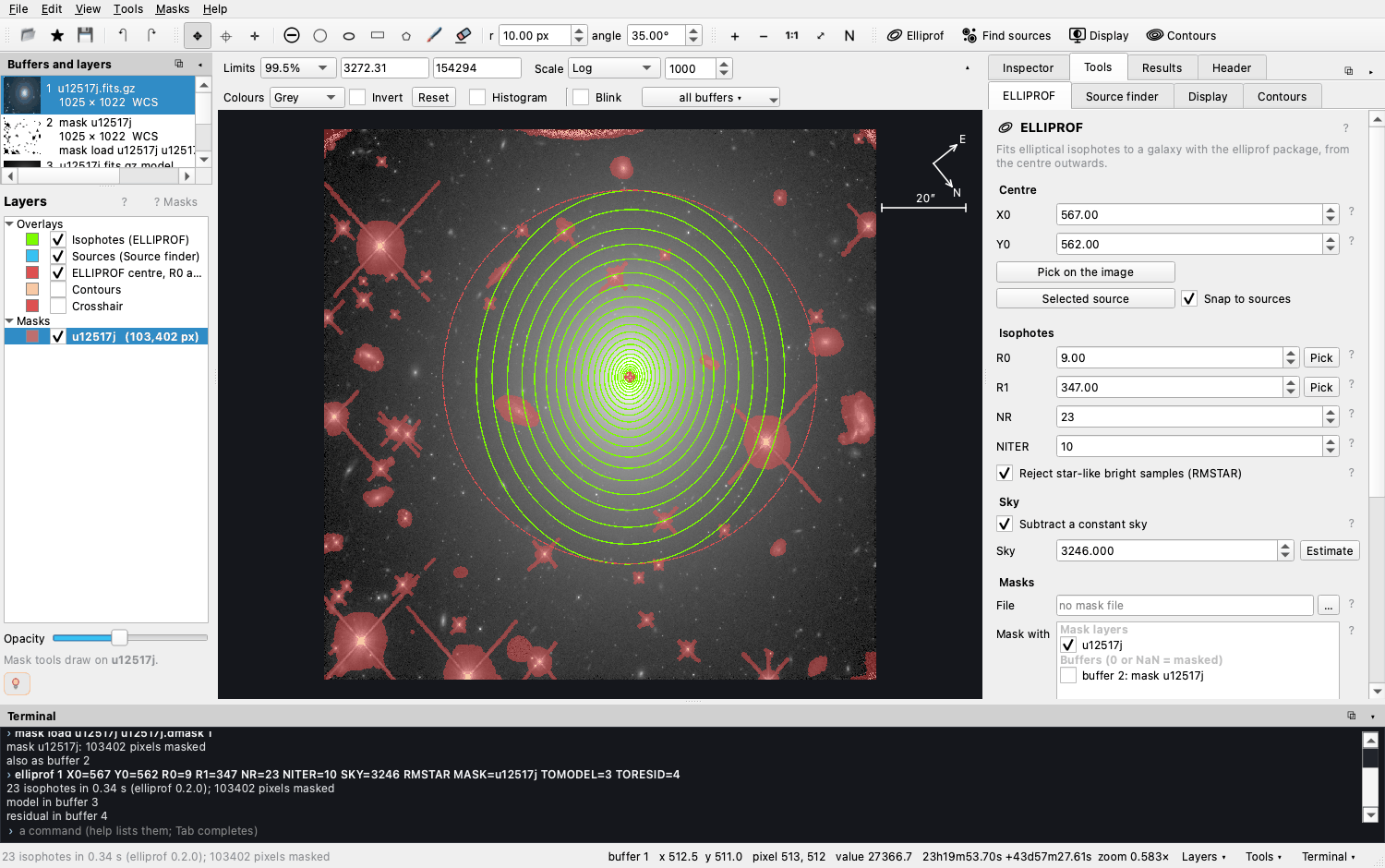
AstroVista Lite fits the isophotes of galaxies (ELLIPROF), finds and measures the stars and galaxies around them, masks what is in the way, and does arithmetic on whole images, all in one window, with a terminal that speaks a MONSTA-style command language. It is the lite edition of AstroVista, an astronomical image analysis studio in development: simple enough for students and classrooms, useful for everyday work.
pip install AstroVista
astrovista --example- Supported systems
- Installing: with pip, with conda, Linux libraries, upgrading and removing
- Starting it
- A first session
- Documentation
- The terminal and its commands
- Masks for ELLIPROF (.dmask files)
- What it does, in detail
- Troubleshooting
- Developing and testing
- Licence · Citing · Credits
| Supported | Notes | |
|---|---|---|
| macOS | 13 (Ventura) or later, Apple silicon and Intel | |
| Linux, x86_64 | glibc 2.34 or later: Ubuntu 22.04+, Debian 12+, Fedora 35+, RHEL / Rocky / Alma 9+ | a graphical desktop session |
| Linux, ARM (aarch64) | glibc 2.39 or later: Ubuntu 24.04+ | |
| Windows | not yet | WSL2 on Windows 11, which runs Linux desktop programs, should work with the Linux instructions, but is untested |
| Python | 3.10, 3.11, 3.12, 3.13 | 3.14 works too, but one dependency (SEP) is then compiled during the install, which needs a C compiler |
These limits come from the ready-built packages of the libraries it uses (Qt for Python 6.11 sets the macOS and glibc versions). On an older system, conda usually still works. Every change is tested on Ubuntu (x86_64 and ARM) and macOS, with Python 3.10 to 3.13, including a whole session in a real X11 window.
Everything comes with one pip install: the window, ELLIPROF (through the
elliprof package, ready-built: no Fortran compiler
needed) and the source finder (SEP). The PyPI name is AstroVista; astrovista and
astrovista-lite install the same program.
First check which Python you have:
python3 --version # 3.10 to 3.13: use pip below; missing or older: use condaA virtual environment keeps AstroVista Lite and its libraries apart from the rest of your system:
python3 -m venv ~/astrovista-env
source ~/astrovista-env/bin/activate
pip install --upgrade pip
pip install AstroVista
astrovista --example
Next time, source ~/astrovista-env/bin/activate and then astrovista.
If your Python is older than 3.10 (or missing), or you cannot install system packages, a conda environment brings its own Python. Miniforge is a small, free conda installer:
conda create -n astrovista -c conda-forge python=3.12 pip
conda activate astrovista
pip install AstroVista
astrovista --example
If pip then reports No matching distribution found for PySide6 (an older Linux, or an older macOS), take Qt and the scientific libraries from conda-forge, and only AstroVista from pip:
conda create -n astrovista -c conda-forge python=3.12 pip pyside6 pyqtgraph numpy scipy astropy matplotlib sep
conda activate astrovista
pip install AstroVista
pip uses what conda installed and adds only AstroVista and elliprof. Next time,
conda activate astrovista and then astrovista.
The window is drawn by Qt, which needs a few libraries every desktop already has. On a minimal system (a fresh server, WSL, a container) where Qt reports that it could not load the Qt platform plugin "xcb", install them:
sudo apt install libxcb-cursor0 libxkbcommon-x11-0 libegl1 libgl1 libfontconfig1 libdbus-1-3   # Debian, Ubuntu
sudo dnf install xcb-util-cursor libxkbcommon-x11 mesa-libEGL mesa-libGL fontconfig dbus-libs # Fedora, RHELpip install --upgrade AstroVista # the newest version
astrovista --version
pip uninstall AstroVista # or delete the environment: rm -r ~/astrovista-envastrovista # the window, with a welcome screen
astrovista --example # the UGC 12517 example, shipped with the package
astrovista galaxy.fits # your own images
astrovista -i galaxy.fits "frame.fits[sci]" -m galaxy.dmask # images into buffers 1, 2; a mask layer
astrovista --run session.txt # replay a file of commands
astrovista --help # every option-i loads images into buffers 1, 2, … in the order given (name.fits[sci] picks one
image of a file) and -m loads masks (FITS or .dmask, 0 = masked) as mask layers,
ticked for the fit; both can be repeated. astro-vista, astrovista-lite and
python -m astro_vista start the same program.
- File ▸ Open example (or
astrovista --example) loads a Hubble image of the galaxy UGC 12517 and its mask, with the parameters of elliprof's published fit. - Press Fit isophotes. Green ellipses follow the galaxy's light; Results ▸ Profile plots the intensity against the radius (tick R¼ law for de Vaucouleurs' law).
- Tools ▸ Source finder ▸ Find sources finds and measures the other stars and galaxies; Mask the found sources (ELLIPROF tab) masks them all but the galaxy.
- Fit again, choose the residual buffer on the left, tick Blink and press ← → to compare the image, the model and the residual.
The tutorial walks through this with screenshots and questions for students; the same lesson is in Help ▸ Documentation ▸ A first lesson.
| Where | What |
|---|---|
| Website | a tour with screenshots |
| Tutorial | a lesson on UGC 12517, with questions and exercises for a class |
| The terminal | how a command line is written: syntax, buffers, coordinates, formulas, variables, programs, the keyboard, command files |
| Command reference | every command with its keywords and an example |
| Recipes | worked examples |
| Help ▸ Documentation (F1) | all of this inside the program, with a search box, a FAQ, troubleshooting and Every setting explained; the ? beside each setting opens its entry |
Every action that changes data is a command, typed for you in the terminal at the bottom of the window, so students learn the commands by watching; you can also type them, repeat them (↑), complete them (Tab), and save a session as a file that runs again. The names and style follow MONSTA (see Credits):
rd 1 galaxy.fits[sci]              read an image (an HDU number or name) into buffer 1
sources 1 DETECT_THRESH=2.5        find the sources (stars and galaxies)
mask new mymask 1                  a mask layer the size of buffer 1
mask sources mymask SCALE=1.5      mask the sources, except the galaxy at the centre
mask circle mymask 812 440 12      mask a circle (ERASE unmasks)
mask save mymask galaxy.dmask      save it as a legacy .dmask bitmap
set xc=567 yc=562                  variables, usable in any keyword
elliprof 1 X0=xc Y0=yc R0=9 R1=347 NR=23 MASK=mymask TOMODEL=3 TORESID=4
[4] = [1] - [3]                    arithmetic on whole images
wd 4 residual.fits                 write a buffer
run session.txt                    run a file of commands
Image commands in the style of MONSTA: ac sc mc dc, ai si mi di,
log ln sqrt inverse round, mn max min abx print, shift rotate flip bin mash,
smooth filt zap clip skysub, fft noise gauss, ch chead, set typ. Programs on
your computer run there too (ls, grep, …; ! forces the shell). help lists the
commands and help name explains one; the
command reference gives them
all.
Making masks is often the slowest part of fitting a galaxy, and a good exercise for students. AstroVista Lite makes it quick:
- draw circles, ellipses, boxes, polygons and brush strokes; an ellipse, box or polygon waits to be applied, so it can be moved, resized and rotated first (Enter applies, Esc cancels); Alt or Shift unmasks; the eraser unmasks along its path; Ctrl+Z undoes;
- mask every found source at once, or those matching a condition
(
MAG_AUTO < 22 and FWHM_IMAGE < 3), or their segmentation grown by a few pixels; - mask NaN pixels or a range of values (saturation), grow, shrink, invert and combine layers;
- save a layer (right-click it ▸ Save as… ▸ Legacy bitmap, or
mask save NAME file.dmask) as the BITPIX = 1.dmaskbitmap that elliprof and older pipelines read, or as FITS; load.dmaskand FITS masks back (0 = masked, 1 = good).
- ELLIPROF isophote fitting of galaxies, through the
elliprofpackage: the profile table and plots, the isophotes drawn on the image, and the model and residual images. - The Source finder: the stars and galaxies in the image, measured (position, shape, flux, magnitude, size) and drawn on the image, with a sortable catalogue, plots, numbered runs and the segmentation image. The model, residual and segmentation images go into the buffers chosen (only free buffers are offered unless asked otherwise).
- For teaching: a welcome screen; built-in documentation, Help ▸ Documentation (F1), with a First lesson (about thirty minutes on the example galaxy), recipes, image arithmetic in detail, the terminal's syntax, a reference of every command, a FAQ and troubleshooting; a ? next to each tool and each setting, all explained in Help ▸ Documentation ▸ Every setting explained; Help ▸ Tips and Help ▸ About.
- Panels are resized by dragging their edges, folded to a narrow strip with the button in their title bar (or a double-click on it, or the buttons in the status bar), and popped out as windows of their own (⧉) for another monitor, then put back (⤓). View ▸ Reset the layout restores the standard layout.
- The galaxy's centre from the sources: pick it on the image (a click inside a source snaps to its centre), or double-click a source in the table.
- Layers: isophotes, sources, the ELLIPROF centre with R0 and R1, contours, a crosshair, and any number of mask layers, each shown or hidden and in its own colour; masks with their own opacity. The compass and scale bar are shown for images with a WCS.
- Arithmetic on images:
[3] = [1] - [2],[4] = median([1], [2], [3]),[5] = [1] - median([1]),[6] = div([1], [2], 0),[7] = [1] * mymask(a mask layer: NaN where it masks), comparisons,where,clipand the usual functions (help calc). Dividing by zero gives NaN, never infinity. - Files: FITS images are recognised by their contents, whatever they are called
(gzip-compressed too); one image of a multi-extension file opens as
name.fits[sci],[1]or[sci,2](fitsinfolists them); File ▸ Open recent; images and masks can be dropped on the window. - Profiles: the ELLIPROF profile against R or R¼, with the de Vaucouleurs law fitted and over-plotted (Re, Ie and the scatter about the law).
- Contours, with DS9's settings: the number of levels, their scale and limits, the smoothing, the editable list of values, and the line colour, width and dashes.
- The Inspector: the pixel under the cursor or the crosshair, its value and sky position, a magnified view, and the statistics around it.
- The display: limits from percentiles, ZScale, ZMax, min-max or typed, or dragged on the histogram; linear, log, power, square-root, squared, asinh, sinh and histogram-equalised stretches; twelve colour maps; contrast and bias (drag with the right mouse button); zoom, 1:1, North up, rotation and mirroring; Go to a pixel or RA/Dec; blinking between buffers (← →), on the same patch of sky through the WCS when zoomed in.
- Exports: the profile and source tables as CSV files whose columns line up, the profile and plots as PNG figures (matplotlib), the isophotes as DS9 regions, any buffer as FITS, and the session as a command file.
Coordinates: X0, Y0 and the mask commands use ELLIPROF's coordinates, in which the first pixel spans 0 to 1 (its centre is at 0.5). The status bar shows these, the pixel's column and row (from 1), its value and its sky coordinates.
| Problem | What to do |
|---|---|
python3: command not found, or a Python older than 3.10 |
use conda, or install Python from python.org |
No matching distribution found for PySide6 |
your system is older than the supported systems: use the conda-forge recipe above |
error: externally-managed-environment |
your system's Python does not allow pip: use a virtual environment or conda |
could not load the Qt platform plugin "xcb" (Linux) |
install the libraries Qt needs |
| Building SEP fails (Python 3.14) | use Python 3.10–3.13, or install a C compiler (Xcode command-line tools on macOS: xcode-select --install; sudo apt install build-essential python3-dev on Linux) |
astrovista: command not found |
activate the environment it was installed in, or run python -m astro_vista |
| The panels are in a strange place | View ▸ Reset the layout |
The window's layout and recent files are remembered in ~/.config/AstroVista/astro-vista.ini;
deleting that file starts afresh. Help ▸ Documentation ▸ Troubleshooting and FAQ have
more.
git clone https://github.com/ekourkchi/AstroVista-Lite.git
cd AstroVista-Lite
python3 -m venv .venv && source .venv/bin/activate
pip install -e '.[test]'
pytest -q
The tests run offscreen (no window appears); python tests/smoke.py out runs a whole
session in the real window. paper/ holds the drafts of the JOSS paper (paper.md) and
the arXiv manuscript (arxiv/main.tex, built with make there); python paper/make_figures.py remakes their figures and numbers from the example. Contributions
are welcome: see CONTRIBUTING.md. python docs/build.py rebuilds the website's terminal and
reference pages from src/astro_vista/reference.py, the same source as the program's own
documentation.
MIT (see LICENSE). The
libraries it installs keep their own licences, listed under Credits.
If AstroVista Lite helps your work or your teaching, please cite it, with the version you
used (astrovista --version):
Kourkchi, E., AstroVista Lite, version 1.0.1, https://github.com/ekourkchi/AstroVista-Lite
GitHub's "Cite this repository" button gives the same from
CITATION.cff.
Each release will also be archived on Zenodo with a DOI to cite, and a paper describing
AstroVista Lite is in preparation for the Journal of Open Source Software and arXiv
(drafts in paper/); this
section will give the paper's reference once it is published.
For the measurements, please also cite elliprof (isophotes), and SEP and SExtractor (the Source finder), listed below.
AstroVista Lite is by Ehsan Kourkchi.
John Tonry. ELLIPROF, the isophote fitting at the heart of AstroVista Lite, was originally developed by John Tonry as part of MONSTA; it is used here through the elliprof package, which compiles his original code unchanged. The terminal follows the command language of MONSTA, John Tonry's image analysis and plotting system, which joined Vista (originally by Richard Stover and Tod Lauer, with image display by John Tonry) and Mongo (by John Tonry). The commands of AstroVista Lite are new code written in that style.
It is built on:
- elliprof: John Tonry's ELLIPROF as a Python package (github.com/ekourkchi/elliprof; the package is MIT, the original ELLIPROF sources keep their own terms).
- SEP (Source Extraction and Photometry), by Kyle Barbary and contributors (github.com/sep-developers/sep, LGPL-3.0): K. Barbary 2016, Journal of Open Source Software 1(6), 58. The Source finder uses it.
- SExtractor, whose algorithms SEP implements: E. Bertin & S. Arnouts 1996, Astronomy & Astrophysics Supplement Series 117, 393. Please cite SEP and SExtractor when you publish measurements from the Source finder.
- Qt for Python (PySide6, LGPL), pyqtgraph (MIT), matplotlib (the PNG figures; matplotlib licence, BSD-style), NumPy, SciPy and Astropy (BSD).
- The example image of UGC 12517 (Hubble Space Telescope, WFC3/IR, F110W) and its mask come from the elliprof package's example.
The same list is in Help ▸ Documentation ▸ Credits.