

Read Femtonics .mesc two-photon recordings in Python — the frames in the units the native
reader shows, every unit's metadata, an export, a write-back, and a viewer that draws ROIs and
computes their dF/F.
pip install mesc-io
pip install "mesc-io[tiff,imagej]"     # + TIFF export, ImageJ ROI export
Needs Python 3.9 or newer, numpy and h5py; nothing else for reading and viewing. Motion
correction (mesc-io register) is an extra, [register], and pulls in Suite2p 0.14.
from mesc_io import MescFile

with MescFile("recording.mesc") as f:
    for u in f.units():
        print(u.path, u.shape, u.frame_rate_hz, u.pixel_size_um)

    frames = f.read("MUnit_0", channel=0)              # reader units, float64
    frames = f.read("MUnit_0", reader_units=False)     # the stored integers
    for block in f.iter_frames("MUnit_0", block=500):  # bigger than memory
        ...
read refuses over 4 GB by default (max_gb=None to override). A unit name that matches in
more than one session is refused, not resolved to the first; MSession_1/MUnit_0 always works.
mesc-io info      recording.mesc                            # units, rates, pixel sizes
mesc-io check     recording.mesc                            # what the file disagrees with itself about
mesc-io export    recording.mesc MUnit_0 u0.h5              # or u0.tif
mesc-io writeback recording.mesc out.mesc MUnit_0 u0.h5     # processed frames back in
mesc-io view      recording.mesc                            # the recording in a browser
info and check take --json.
mesc-io register recording.mesc recording_MC.mesc          # one reference per unit
mesc-io preset save soma --block-size 128 --max-shift-nr 5 # name a set of settings
mesc-io register recording.mesc out.mesc --preset soma     # use it; a flag still wins
Needs pip install "mesc-io[register]". The defaults are the calcium-imaging pipeline's own
correction; z-stacks and units too short to register are skipped and said so. Groups, presets,
where they are kept and how to share them: docs/registration.md.
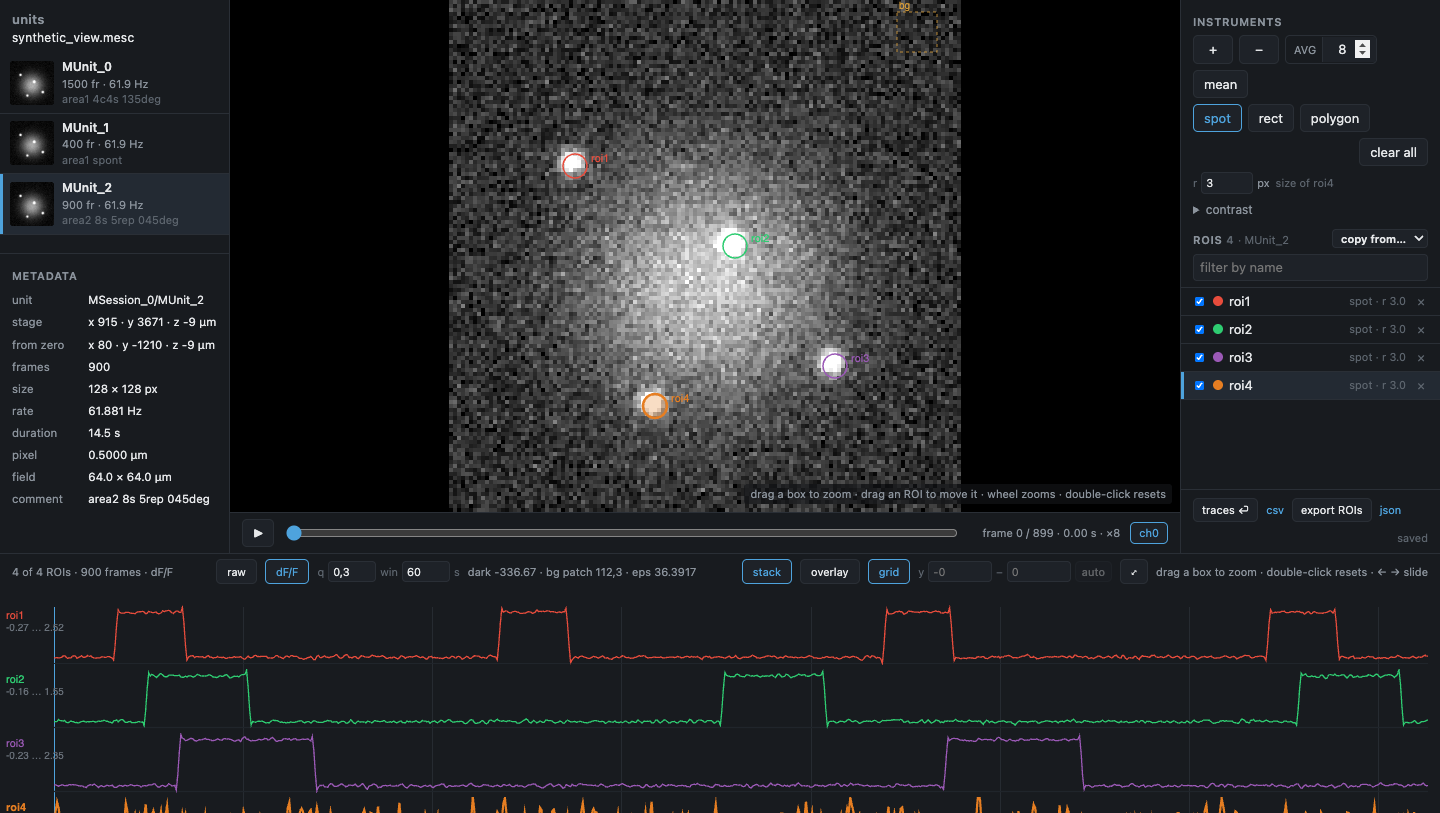
mesc-io view opens the recording in a private browser window: units on the left with a
thumbnail each and the unit's own metadata (rate, pixel size, the stage position and the
position from the zero set on the rig); the image in
the middle — scrub it, average a window of N frames, zoom into a place by dragging a box;
ROIs on the right (spot, rectangle, polygon; drag to move, type a size); every ROI's time
course along the bottom, raw or dF/F by our pipeline's method (mesc_io.dff, numpy only,
held against the pipeline's functions in the tests), stacked or overlaid, zoomed by dragging a box. ROIs belong to the
unit they were drawn on and are saved as you go, beside the working directory, never beside
the raw file; so is the view itself, so reopening the file puts you back where you were.
A z-stack is shown in slices and microns, with a max projection, a 3D view you can turn
(MIP, semi-transparent, or coloured by depth) and XYZ orthogonal views through one crosshair.
Layout and decisions: docs/viewer_design.md.
To try it without a recording, make one:
python tools/make_synthetic.py            # writes synthetic_view.mesc: 3 units, 4 spots, 3 of them blinking
mesc-io view synthetic_view.mesc
pip install -e ".[tiff,dev]"
pytest
The package lives under src/, so tests run against the installed copy. CI runs the suite on
Python 3.9, 3.12 and 3.13 on Linux, macOS and Windows, plus one job with Suite2p for the
registration tests; the browser checks (tests/*_real_chrome.js) run in a real Chrome and are
not part of pytest.
F. Kamari, for the idea. Claude Code, for the debugging.
MIT — see LICENSE.